

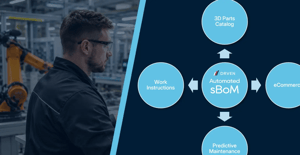
A digital parts catalogue may be the part that users see, but its value to the OEM depends on the data underneath it.
Behind every accurate search result, interactive exploded product view and correctly identified replacement part is a set of relationships. The system needs to know which components belong to which product, which of those components can be purchased, what they are called, how they are supplied and whether they fit the particular configuration being maintained.
This information rarely exists in one usable source, which is a problem that compounds as the manufacturer grows in size.
An OEM may hold detailed CAD models, engineering part numbers, manufacturing structures, ERP records, spreadsheets, service manuals and years of product knowledge. Yet the technician repairing the product may still have to work from an old PDF, send a photograph to technical support or ask the most experienced person in the business which part is needed.
The problem is not necessarily a lack of data, the OEM already has lots of it, but that data is rarely structured for the people selling, identifying, maintaining and replacing parts.
That is the role of a Service Bill of Materials (sBoM).
What is a Service Bill of Materials?
A Service Bill of Materials is a structured and commercially usable representation of the parts, assemblies and associated content that an OEM makes available for identification, sale, service and support.
It translates the product from the way engineering designed it, or the way manufacturing built it, into the way aftermarket teams, dealers, technicians and customers need to understand it.
An sBoM can establish:
- Which components are available to purchase
- Whether a component is sold individually, as part of a kit, or only within a larger assembly
- The relationship between engineering and sales part numbers
- The product models, variants and configurations to which a part applies
- The name and description that should be presented to the user
- Which parts have been replaced or superseded
- The quantity required and Minimum Order Quantities (MOQs)
- The price or pricing reference
- The relevant imagery, documents and technical information
- The instructions, tools and service actions associated with the part
This means the sBoM is more than a list of stock items. It is the structured layer that connects the physical product with the commercial and technical information needed to support it.
A quick note on BoM terminology
Bill of Materials terminology is not universal, so it makes sense to give you an explanation of how different industries, systems and departments use different BoM definitions.
Even the abbreviation “sBoM” can describe very different things.
In cybersecurity for example, SBOM commonly means 'Software Bill of Materials': a record of the software components and supply-chain relationships within an application or connected product. Organisations including CISA, (America's Cyber Defense Agency), use the term in this context.
Some ERP systems define a 'Sales BoM' too as a collection of items sold together. A manufacturer might, for example, group a mirror, bonding, plastic case, wiring loom, indicator light and other components into a full wing mirror and only sell it as the assembled kit, as opposed to selling a glass mirror on it's own. The kit can be added to a sales order as one product while its constituent components remain visible or individually priced.
SAP describes 'Sales BoMs' as predefined component structures that can be used in sales documents and solution orders.
At DRVEN, sBoM means Service Bill of Materials in an OEM aftermarket context: the structured representation of sellable parts and associated sales and service content required to identify, order, maintain and support a product.
We use the lowercase “s” partly to distinguish this definition from the widely recognised cybersecurity abbreviation, although organisations may format the term and the acronym however they like.
eBOM, mBOM, sBOM and SBOM: what is the difference?
There are many types of Bill of Materials because different teams need to view the same product from very different perspectives:
| BOM structure | Primary purpose | The question it answers |
|---|---|---|
| eBoM: Engineering Bill of Materials | Represents the product as designed by engineering | What components and assemblies make up the design? |
| mBoM: Manufacturing Bill of Materials | Represents the materials, components and structure needed to manufacture the product | What is required to build and assemble it? |
| sBoM: Service Bill of Materials | Represents the sellable parts, commercial relationships and aftermarket content associated with the product | What can someone identify, buy and use to maintain or repair it? |
These structures are related, but they are not interchangeable.
The eBoM typically reflects the product’s intended design, and may be organised around functions, systems and engineering assemblies.
The mBoM takes that engineering definition and reorganises it around production. It can include the materials, parts and manufacturing relationships needed to build the finished product. Siemens, for example, describes an mBoM as the list of the materials and parts required to produce a specific product.
The sBoM then views the same product, but from a different point in its lifecycle - the aftermarket for service and maintenance. It considers what happens at the moment of product failure when someone needs to identify, purchase, replace or work with a component.
Why can’t aftermarket teams simply use the eBoM or mBoM?
The engineering and manufacturing structures contain valuable product intelligence, but they were not created to answer aftermarket questions.
For example, consider an engineering assembly containing 40 components. From an engineering perspective, all 40 may be important to the definition and function of the production assembly, but from a manufacturing perspective, they may need to be sourced, sequenced and installed individually.
In the aftermarket, however, the commercial structure could be completely different:
- Ten components may be available individually.
- Five may only be grouped into a service kit.
- Minimum Order Quantity (MOQ) can impact what you can order.
- Several may only be sold as part of a replacement assembly.
- Some may be non-serviceable.
- One may have been superseded by a newer design.
- Another may require a different part according to the product’s serial number.
- The repair may also require consumables that do not appear in the original engineering assembly.
The challenges of translating an eBoM to an sBoM compounds whereby the engineering part number will 99% of the time not match the aftermarket part number, the name used internally may not mean anything to a dealer or technician, and a component that appears in CAD may not be stocked, priced or available to order.
It isn't that the source data is wrong, but an eBoM or mBoM is describing the product and considering parts and components for a very different purpose - and this is key to why OEMs may have all the data they need, but it just does not translate to the aftermarket world of service, maintenance and spare parts sales.
This is why copying an eBoM into a parts catalogue does not create a usable aftermarket experience. The data must first be interpreted and transformed.
The hidden data problem behind the electronic parts catalogue
When an OEM decides to introduce a digital or interactive parts catalogue, attention naturally goes to the interface.
Teams think about 3D models, exploded views, search tools, product navigation, ecommerce integration and the experience of adding a component to an order.
Those features are important, but they depend on a more fundamental piece of work: determining what the catalogue should contain.
-
Which engineering components are sellable?
-
Which should be hidden?
-
How should assemblies be divided?
-
Which parts belong together?
-
Which commercial information should appear against each item?
-
How should the engineering structure connect to the structure understood by the aftermarket?
Traditionally, answering these questions can involve exporting data into a spreadsheet and asking product specialists to enrich it manually.
A manual sBoM creation process could therefore take hundreds of hours, or weeks, of time to create templates containing engineering part numbers and names extracted from CAD, while a user manually maps sales information such as aftermarket part numbers, display names, descriptions and prices against those records.
For one assembly that may seem manageable, but across a portfolio containing thousands of products, variants, assemblies and components, it becomes a significant data project.
It also creates a maintenance problem, because every engineering change, new product configuration, superseded part or revised commercial relationship must find its way into the systems used by the aftermarket too - ultimately leading to more data work, or a parts catalogue that can quickly become out of date.
The catalogue may look modern while the process keeping it accurate remains manual.
The real value is in creating the sBoM
This is why the greatest value of a parts catalogue project is not actually the catalogue itself, but in fact is the sBoM that underpins the accuracy, trustworthiness and value of the data that supports a parts catalogue, work instructions or aftermarket insights.
Creating an sBoM forces an OEM to establish the relationships between:
- The product as designed
- The product as manufactured
- The configurations placed into the market
- The components available to purchase
- The commercial content associated with those components
- The service actions required to maintain the product
And once these relationships exist in a structured form, they can be used by more than one platform, department or user group.
The same underlying component can appear in an interactive parts catalogue, a work instruction, or a scheduled maintenance activity and a warranty claim without each system needing its own separately maintained version of the relationship.
The catalogue is where someone interacts with the information, but it's the sBoM that makes that information accurate, connected and useful.
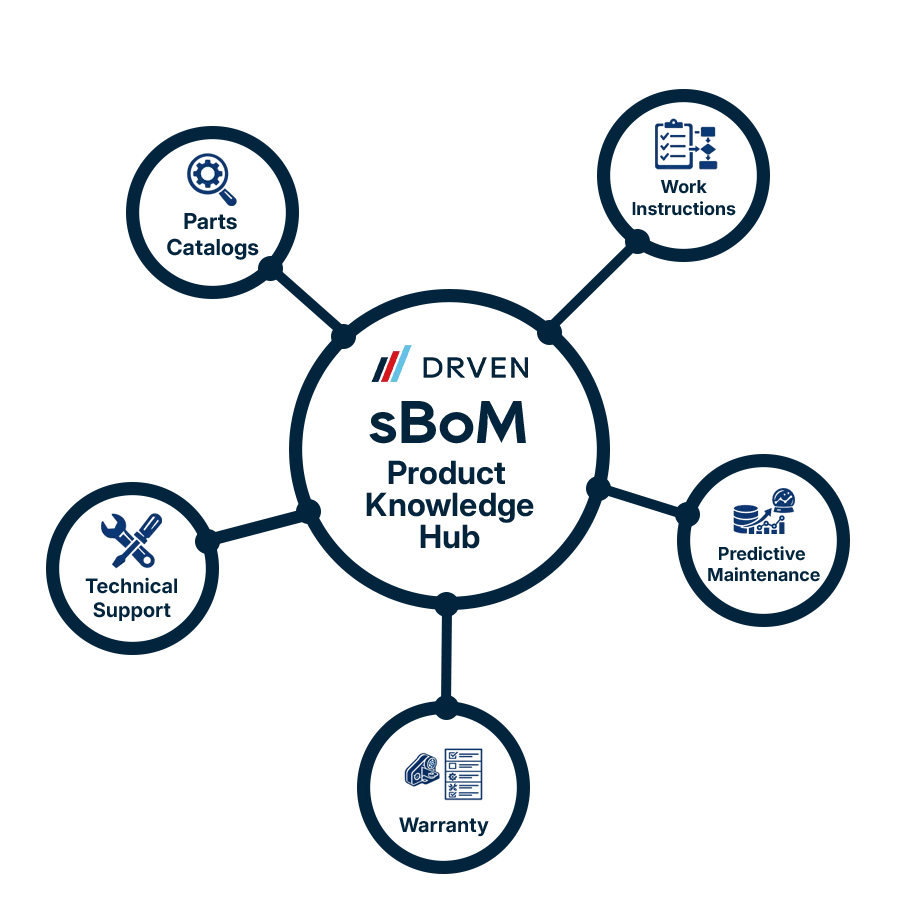
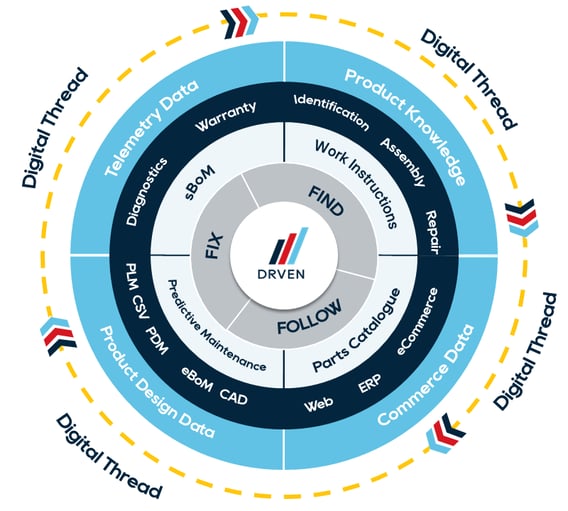
Think of it like a Hub and Spokes wheel model, where the sBoM is the knowledge hub, and the end applications like the parts catalogue or work instructions, are spokes all feeding from the same master data.
What can an sBoM power?
A well-structured sBoM can support a range of aftermarket and product-support experiences as follows:
Parts identification
A technician, dealer or customer can navigate the product visually and identify the correct sellable component within the context of the complete assembly.
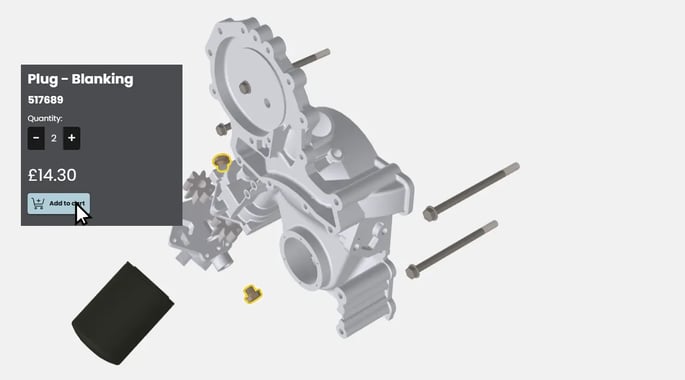
Instead of trying to translate an engineering drawing or describe a component over the telephone, the user can see where the part fits and select it directly.
Parts catalogues and Commerce
The sBoM connects the product structure with sales part numbers, descriptions, pricing, availability and ordering information.
It can also represent kits and product bundles. A group of related items can be offered under one SKU, while the individual components and their prices remain structured beneath it.
Work instructions
A work instruction needs to refer to the right product, assembly and component. By using the same underlying structure as the parts catalogue, instructions can be associated with the relevant parts and configurations.
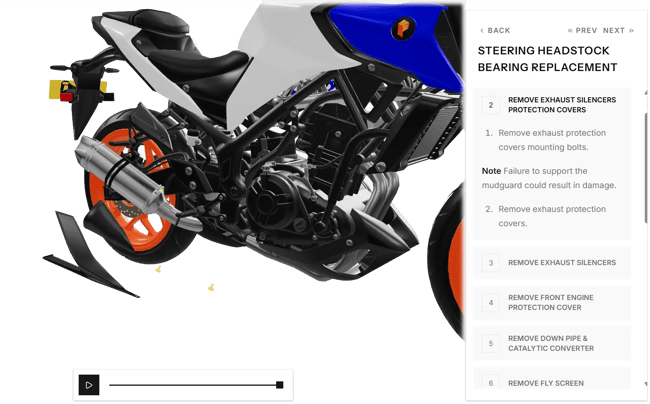
This helps the user move from identifying a problem to understanding what is required to complete the work.
Planned and predictive maintenance
Connected product data may indicate that an inspection or intervention is required, but an alert alone does not complete the maintenance task.
The service organisation still needs to determine:
- Which asset and configuration are affected
- Which component requires attention
- Which replacement part or kit is appropriate
- Whether it is available
- What procedure should be followed
- What tools, consumables and skills are required
The sBoM provides the product and part relationships needed to turn a maintenance signal into an actionable workflow.
Warranty and technical support
Warranty teams need to connect a claim to the correct product, component, serial number, service history and replacement part.
Technical support teams need the same product context when diagnosing a fault or advising a dealer. A shared sBoM reduces the need for every team to interpret the product independently.
AI-assisted service
AI can make service information easier to find and use, but it still requires reliable underlying context.
If product structures, part relationships and fitment rules are fragmented or ambiguous, AI will simply just retrieve the wrong information more efficiently. A structured sBoM therefore gives AI systems a stronger foundation for answering product-specific questions and guiding users towards the correct parts and procedures.
From manual spreadsheets to automated sBoM creation
Historically, creating an sBoM has required extensive input from people who understand both the engineering structure AND the commercial aftermarket.
These people are often among the most experienced employees in the organisation. Their involvement remains valuable because they understand why a component is sold in a certain way, which exceptions exist and how customers refer to the product.
The problem is asking those experts to reconstruct the entire product structure manually, and move into technical authoring.
DRVEN uniquely automates the creation of the sBoM by using the OEM’s existing product and engineering data to create a structured aftermarket data layer that supports parts identification, work instructions, and dealer portals. Instead of beginning with a blank spreadsheet, the business begins with a connected digital representation of the product that can then be validated and enriched with its specific commercial and service rules.
This changes the nature of the work because subject-matter experts can focus on decisions, exceptions and valuable product knowledge rather than copying and matching part identifiers, rebuilding assembly relationships from scratch, or mapping every component by hand.
It also makes the approach more scalable because the sBoM is not created as an isolated file for one catalogue. It becomes reusable intellectual property that can support multiple products, systems, workflows and audiences.
The missing layer in the digital thread
The digital thread is intended to connect information across the product lifecycle, but that should include more than the journey from engineering into manufacturing - it needs to flow into the aftermarket ecosystem too!
NIST’s work on the extended digital thread specifically considers the quality of information across design, production and the use of the resulting product. In practice, however, the thread often becomes much thinner once the product leaves the factory.
-
Engineering maintains its design systems.
-
Manufacturing has its production data.
-
ERP contains parts and commercial records.
-
Service information appears in manuals, spreadsheets, portals and the knowledge of experienced employees.
The connections between those sources are left for technicians, dealers and support teams to make.
The sBoM helps extend the digital thread into the aftermarket. It preserves the connection to the original product definition while translating it into a structure that reflects how the product will be sold, maintained, repaired and supported.
It can also help information travel in the other direction, where parts demand, recurring failures, warranty activity and service experience can be associated with the relevant product structure too, giving the OEM better insight into how products perform once they enter service. Ultimately, leading towards the holy grail of predictive maintenance and automation.
The catalogue is the experience. The sBoM is the foundation.
Investing in a better parts catalogue can transform the way dealers, technicians and customers identify and order components, but the interface is only part of the value.
The more important asset is the structured data layer created underneath it: the relationship between engineering components, manufactured products, sellable parts and the information people need to act.
Without that sBoM data layer, OEMs risk reproducing the same fragmented product data inside a more attractive interface, which can also be out of date by the time it's live.
With it, they create a foundation that can power parts identification, ordering, work instructions, maintenance, warranty, technical support and future AI-enabled services.
And remember, the product data already exists - the opportunity is simply to make it usable by the people responsible for keeping the product working.
That is the real value of the sBoM!